
🛠️ How to Fix MemRelease.dll CRC Error
If you are getting this error when starting MUPH Reborn:
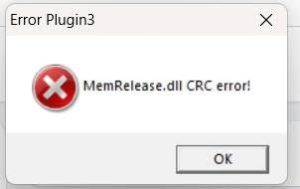
❌ Error Plugin3
MemRelease.dll CRC error!
Follow the instructions below carefully.
Step 1 — Download the Visual C++ Runtime
Download the Visual C++ Runtime package here:
Download Visual C++ Runtime Package
Step 2 — Extract the package
After downloading:
- Open the downloaded ZIP/RAR file.
- Extract the folder to your Desktop.
- Open the extracted folder.
You should see files similar to:
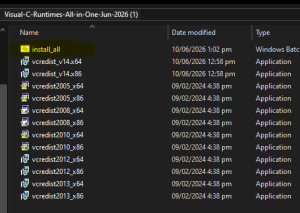
Step 3 — Run install_all
This is the easiest and recommended method.
- Right-click
install_all - Select Run as administrator
- Wait while the Visual C++ Runtime packages are installed.
- Do not close the installer while it is working.
- Wait until the installation process is completely finished.
You don’t need to manually install every file if install_all successfully installs them.
Step 4 — Restart your PC
After the installation finishes:
Restart Windows.
This step is recommended before testing the MU client again.
Step 5 — Run MUPH Reborn
After restarting:
- Open your MUPH Reborn folder.
- Run the MUPH Reborn Patcher.
- Let the patcher finish completely.
- Start the MU client again.
⚠️ Important
If you are using 64-bit Windows, you should still install the x86 Visual C++ Runtime because most MU Online clients are 32-bit applications.
The package in your screenshot contains both x64 and x86, so running install_all is the simplest option.
If the error still appears
If you still see:
MemRelease.dll CRC error!
after installing the runtimes and restarting Windows, then the problem may be with the MemRelease.dll file itself, rather than Visual C++.
Please message us on our FB page or Discord for further assistance.